Entwickeln Sie einen Prompty#
Experimentelles Feature
Dies ist ein experimentelles Feature und kann sich jederzeit ändern. Erfahren Sie mehr.
Promptflow führt die Funktion prompty ein, die darauf ausgelegt ist, die Entwicklung von Prompt-Vorlagen für Kunden zu vereinfachen.
Erstellen Sie einen Prompty#
Prompty-Spezifikation#
In Promptflow wird eine Datei mit der Erweiterung .prompty als Prompty erkannt. Dieser einzigartige Dateityp erleichtert die Entwicklung von Prompt-Vorlagen.
Ein Prompty ist eine Markdown-Datei. Dieser Front-Matter-Bereich, der in YAML strukturiert ist, enthält eine Reihe von Metadatenfeldern, die entscheidend für die Definition der Modellkonfiguration und der Eingaben für den Prompty sind. Nach diesem Front-Matter-Bereich folgt die Prompt-Vorlage, die im Jinja-Format formuliert ist.
Felder im Front-Matter
Feld |
Beschreibung |
|---|---|
name |
Der Name des Prompts. |
description |
Eine Beschreibung des Prompts. |
model |
Beschreibt die Modellkonfiguration des Prompty, einschließlich Verbindungsinformationen und Parameter für die LLM-Anfrage. |
inputs |
Die Eingabedefinition, die an die Prompt-Vorlage übergeben wird. |
Ausgaben |
Definiert die Felder im Prompty-Ergebnis. (Funktioniert nur, wenn response_format auf json_object gesetzt ist). |
sample |
Bietet ein Dictionary oder eine JSON-Datei mit Beispieldaten für die Eingaben. |
---
name: Basic Prompt
description: A basic prompt that uses the GPT-3 chat API to answer questions
model:
  api: chat
  configuration:
    type: azure_openai
    azure_deployment: gpt-35-turbo
    connection: azure_open_ai_connection
  parameters:
    max_tokens: 128
    temperature: 0.2
inputs:
  first_name:
    type: string
  last_name:
    type: string
  question:
    type: string
sample:
  first_name: John
  last_name: Doe
  question: Who is the most famous person in the world?
---
system:
You are an AI assistant who helps people find information.
As the assistant, you answer questions briefly, succinctly,
and in a personable manner using markdown and even add some personal flair with appropriate emojis.

# Safety
- You **should always** reference factual statements to search results based on [relevant documents]
- Search results based on [relevant documents] may be incomplete or irrelevant. You do not make assumptions
# Customer
You are helping {{first_name}} {{last_name}} to find answers to their questions.
Use their name to address them in your responses.

user:
{{question}}
Laden eines Prompty#
Prompty sind flexibel gestaltet und ermöglichen es Benutzern, die Standardmodellkonfiguration während des Ladevorgangs zu überschreiben.
---
name: Basic Prompt
description: A basic prompt that uses the GPT-3 chat API to answer questions
model:
  api: chat
  configuration:
    type: azure_openai
    azure_deployment: gpt-35-turbo
    api_key: ${env:AZURE_OPENAI_API_KEY}
    api_version: ${env:AZURE_OPENAI_API_VERSION}
    azure_endpoint: ${env:AZURE_OPENAI_ENDPOINT}
  parameters:
    max_tokens: 128
    temperature: 0.2
inputs:
  first_name:
    type: string
  last_name:
    type: string
  question:
    type: string
sample:
  first_name: John
  last_name: Doe
  question: Who is the most famous person in the world?
---
system:
You are an AI assistant who helps people find information.
As the assistant, you answer questions briefly, succinctly,
and in a personable manner using markdown and even add some personal flair with appropriate emojis.

# Safety
- You **should always** reference factual statements to search results based on [relevant documents]
- Search results based on [relevant documents] may be incomplete or irrelevant. You do not make assumptions
# Customer
You are helping {{first_name}} {{last_name}} to find answers to their questions.
Use their name to address them in your responses.

user:
{{question}}
Benutzer können alternative Parameter angeben oder Umgebungsvariablen verwenden, um die Modelleinstellungen anzupassen. Das Format ${env:ENV_NAME} wird verwendet, um auf Umgebungsvariablen zu verweisen.
Verwendung eines Dictionaries
from promptflow.core import Prompty

# Load prompty with dict override
override_model = {
    "configuration": {
        "api_key": "${env:AZURE_OPENAI_API_KEY}",
        "api_version": "${env:AZURE_OPENAI_API_VERSION}",
        "azure_endpoint": "${env:AZURE_OPENAI_ENDPOINT}"
    },
    "parameters": {"max_tokens": 512}
}
prompty = Prompty.load(source="path/to/prompty.prompty", model=override_model)
Verwendung von AzureOpenAIModelConfiguration
from promptflow.core import Prompty, AzureOpenAIModelConfiguration

# Load prompty with AzureOpenAIModelConfiguration override
configuration = AzureOpenAIModelConfiguration(
    azure_deployment="gpt-3.5-turbo",
    api_key="${env:AZURE_OPENAI_API_KEY}",
    api_version="${env:AZURE_OPENAI_API_VERSION}",
    azure_endpoint="${env:AZURE_OPENAI_ENDPOINT}"
)
override_model = {
    "configuration": configuration,
    "parameters": {"max_tokens": 512}
}
prompty = Prompty.load(source="path/to/prompty.prompty", model=override_model)
---
name: Basic Prompt
description: A basic prompt that uses the GPT-3 chat API to answer questions
model:
  api: chat
  configuration:
    type: openai
    model: gpt-3.5-turbo
    api_key: ${env:OPENAI_API_KEY}
    base_url: ${env:OPENAI_BASE_URL}
  parameters:
    max_tokens: 128
    temperature: 0.2
inputs:
  first_name:
    type: string
  last_name:
    type: string
  question:
    type: string
sample:
  first_name: John
  last_name: Doe
  question: Who is the most famous person in the world?
---
system:
You are an AI assistant who helps people find information.
As the assistant, you answer questions briefly, succinctly,
and in a personable manner using markdown and even add some personal flair with appropriate emojis.

# Safety
- You **should always** reference factual statements to search results based on [relevant documents]
- Search results based on [relevant documents] may be incomplete or irrelevant. You do not make assumptions
# Customer
You are helping {{first_name}} {{last_name}} to find answers to their questions.
Use their name to address them in your responses.

user:
  {{question}}
Benutzer können alternative Parameter angeben oder Umgebungsvariablen verwenden, um die Modelleinstellungen anzupassen. Das Format ${env:ENV_NAME} wird verwendet, um auf Umgebungsvariablen zu verweisen.
Verwendung eines Dictionaries
from promptflow.core import Prompty

# Load prompty with dict override
override_model = {
    "configuration": {
        "api_key": "${env:OPENAI_API_KEY}",
        "base_url": "${env:OPENAI_BASE_URL}",
    },
    "parameters": {"max_tokens": 512}
}
prompty = Prompty.load(source="path/to/prompty.prompty", model=override_model)
Verwendung von OpenAIModelConfiguration
from promptflow.core import Prompty, OpenAIModelConfiguration

# Load prompty with OpenAIModelConfiguration override
configuration = OpenAIModelConfiguration(
    model="gpt-35-turbo",
    base_url="${env:OPENAI_BASE_URL}",
    api_key="${env:OPENAI_API_KEY}",
)
override_model = {
    "configuration": configuration,
    "parameters": {"max_tokens": 512}
}
prompty = Prompty.load(source="path/to/prompty.prompty", model=override_model)
Ausführen eines Prompty#
Promptflow bietet vielseitige Methoden zur Ausführung eines Prompty, um die Bedürfnisse der Kunden in verschiedenen Szenarien zu erfüllen.
Direkter Funktionsaufruf#
Sobald das Prompty-Objekt geladen ist, kann es direkt als Funktion aufgerufen werden und gibt den Inhalt der ersten Auswahl in der LLM-Antwort zurück.
from promptflow.core import Prompty

prompty_obj = Prompty.load(source="path/to/prompty.prompty")
result = prompty_obj(first_name="John", last_name="Doh", question="What is the capital of France?")
Testen eines Prompty#
Flow-Test#
Führen Sie Ihren Prompty mit Eingaben oder einer Beispieldatei aus und testen Sie ihn.
# Test prompty with default inputs
pf flow test --flow path/to/prompty.prompty

# Test prompty with specified inputs
pf flow test --flow path/to/prompty.prompty --inputs first_name=John last_name=Doh question="What is the capital of France?"

# Test prompty with sample file
pf flow test --flow path/to/prompty.prompty --inputs path/to/sample.json
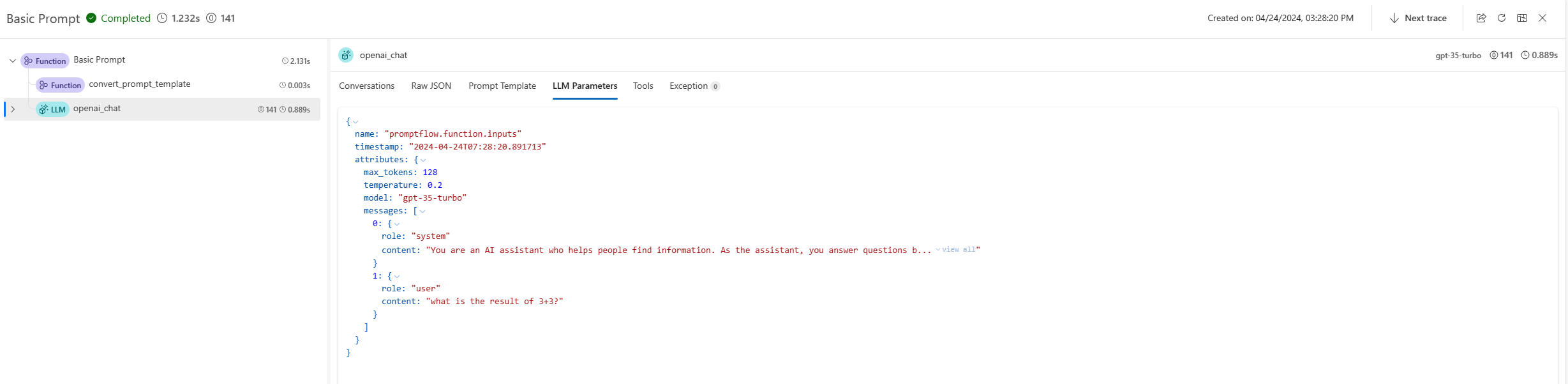
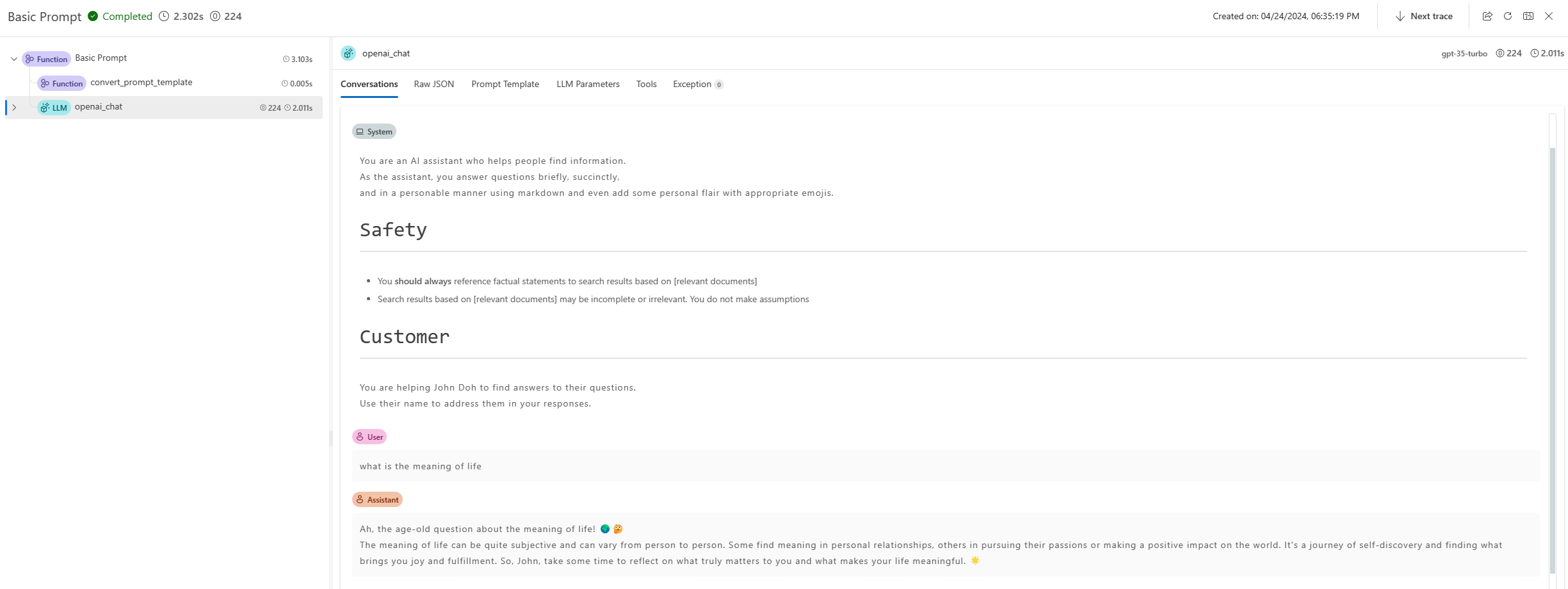
Ein Trace-Link wird im Terminal bereitgestellt, um die internen Ausführungsdetails für diesen Befehl zu visualisieren. Für Prompty können Benutzer den generierten Prompt, die LLM-Anfrageparameter und andere Informationen in der Trace-Benutzeroberfläche finden. Erfahren Sie mehr.
from promptflow.client import PFClient

pf = PFClient()

# Test prompty with specified inputs
result = pf.test(flow="path/to/prompty.prompty", inputs={"first_name": "John", "last_name": "Doh", "question": "What is the capital of France?"})

# Test prompty with sample file
result = pf.test(flow="path/to/prompty.prompty", inputs="path/to/sample.json")
Testen im interaktiven Modus#
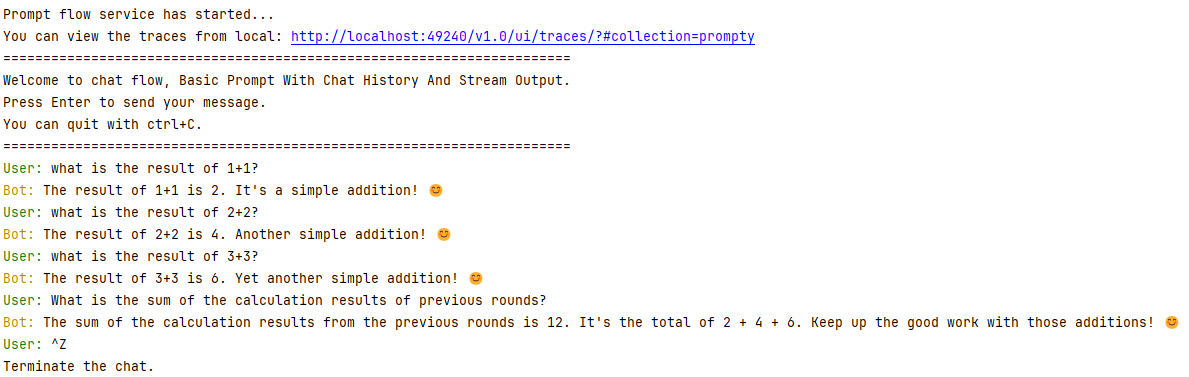
Promptflow CLI bietet auch eine interaktive Chat-Sitzung zum Testen von Chat-Flows.
pf flow test --flow path/to/prompty.prompty --interactive
---
name: Basic Prompt With Chat History
description: A basic prompt that uses the GPT-3 chat API to answer questions
model:
  api: chat
  configuration:
    type: azure_open_ai
    azure_deployment: gpt-35-turbo
    connection: azure_open_ai_connection

  parameters:
    max_tokens: 128
    temperature: 0.2
inputs:
  first_name:
    type: string
  last_name:
    type: string
  question:
    type: string
   chat_history:
    type: list
sample:
  first_name: John
  last_name: Doe
  question: Who is the most famous person in the world?
  chat_history: [ { "role": "user", "content": "what's the capital of France?" }, { "role": "assistant", "content": "Paris" } ]
---
system:
You are an AI assistant who helps people find information.
As the assistant, you answer questions briefly, succinctly,
and in a personable manner using markdown and even add some personal flair with appropriate emojis.

# Safety
- You **should always** reference factual statements to search results based on [relevant documents]
- Search results based on [relevant documents] may be incomplete or irrelevant. You do not make assumptions
# Customer
You are helping {{first_name}} {{last_name}} to find answers to their questions.
Use their name to address them in your responses.

Here is a chat history you had with the user:
{% for item in chat_history %}
   {{item.role}}: {{item.content}}
{% endfor %}

user:
  {{question}}
Terminalausgaben
Batch-Ausführung eines Prompty#
Um eine Batch-Ausführung eines Prompty in Promptflow durchzuführen, können Sie die folgenden Befehle verwenden
pf run create --flow path/to/prompty.prompty --data path/to/inputs.jsonl
Um eine Batch-Ausführung eines Prompty in Promptflow durchzuführen, können Sie das folgende SDK verwenden
from promptflow.client import PFClient

pf = PFClient()
# create run
prompty_run = pf.run(
    flow="path/to/prompty.prompty",
    data="path/to/inputs.jsonl",
)
pf.stream(prompty_run)
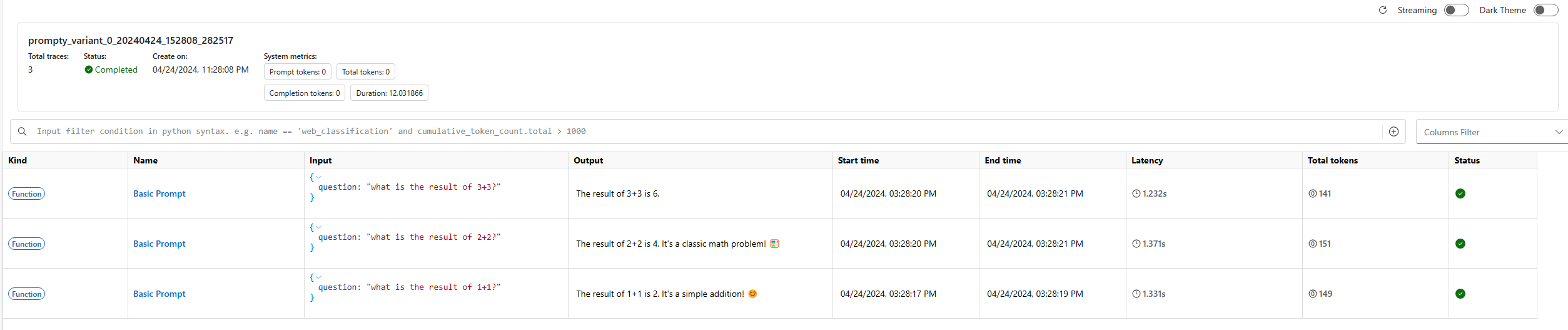
Bei der Ausführung einer Batch-Ausführung bietet Promptflow eine Trace-Benutzeroberfläche zur Visualisierung der internen Ausführungsdetails der Ausführung. Diese Funktion ermöglicht es Ihnen, die Ausführungsdetails jeder Zeile in der Datendatei zu verfolgen, einschließlich des Prompts und der LLM-Anfrageparameter. Erfahren Sie mehr.
Nach dem Starten des Prompt-Flow-Dienstes könnten Sie beispielsweise eine Ausgabe wie diese in Ihrem Terminal sehen
Prompt flow service has started...
You can view the traces from local: http://127.0.0.1:49240/v1.0/ui/traces/?#run=prompty_variant_0_20240424_152808_282517
[2024-04-24 15:28:12,597][promptflow._sdk._orchestrator.run_submitter][INFO] - Submitting run prompty_variant_0_20240424_152808_282517, log path: .promptflow\.runs\prompty_variant_0_20240424_152808_282517\logs.txt
Die Trace-Benutzeroberfläche zeichnet die Ausführungsdetails jeder Zeile in der Datendatei auf und bietet eine umfassende Übersicht über die Leistung und die Ergebnisse der Batch-Ausführung.