Tracing und Observability#
AutoGen verfügt über integrierte Unterstützung für Tracing und Observability zur Sammlung umfassender Aufzeichnungen über die Ausführung Ihrer Anwendung. Dieses Feature ist nützlich für Debugging, Leistungsanalyse und das Verständnis des Anwendungsflusses.
Diese Funktionalität wird durch die OpenTelemetry-Bibliothek ermöglicht, was bedeutet, dass Sie jedes OpenTelemetry-kompatible Backend verwenden können, um Traces zu sammeln und zu analysieren.
AutoGen folgt den OpenTelemetry Semantic Conventions für Tracing, für Agents und Tools. Es folgt auch den derzeit in Entwicklung befindlichen Semantic Conventions for GenAI Systems.
Setup#
Um zu beginnen, müssen Sie das OpenTelemetry Python-Paket installieren. Dies können Sie mit pip tun.
pip install opentelemetry-sdk opentelemetry-exporter-otlp-proto-grpc opentelemetry-instrumentation-openai
Sobald Sie das SDK installiert haben, ist der einfachste Weg, Tracing in AutoGen einzurichten:
Konfigurieren Sie einen OpenTelemetry Tracer Provider
Richten Sie einen Exporter ein, um Traces an Ihr Backend zu senden
Verbinden Sie den Tracer Provider mit der AutoGen-Laufzeitumgebung
Telemetry Backend#
Um Traces zu sammeln und anzuzeigen, müssen Sie ein Telemetry-Backend einrichten. Mehrere Open-Source-Optionen sind verfügbar, darunter Jaeger und Zipkin. In diesem Beispiel verwenden wir Jaeger als unser Telemetry-Backend.
Für einen schnellen Einstieg können Sie Jaeger lokal mit Docker ausführen.
docker run -d --name jaeger \
  -e COLLECTOR_OTLP_ENABLED=true \
  -p 16686:16686 \
  -p 4317:4317 \
  -p 4318:4318 \
  jaegertracing/all-in-one:latest
Dieser Befehl startet eine Jaeger-Instanz, die auf Port 16686 für die Jaeger UI und Port 4317 für den OpenTelemetry Collector lauscht. Sie können auf die Jaeger UI unter https://:16686 zugreifen.
Tracing eines AgentChat-Teams#
Im folgenden Abschnitt werden wir untersuchen, wie man Tracing mit einem AutoGen GroupChat-Team aktiviert. Die AutoGen-Laufzeitumgebung unterstützt bereits Open Telemetry (automatische Protokollierung von Nachrichtenmetadaten). Zunächst erstellen wir einen Tracing-Service, der zur Instrumentierung der AutoGen-Laufzeitumgebung verwendet wird.
from opentelemetry import trace
from opentelemetry.exporter.otlp.proto.grpc.trace_exporter import OTLPSpanExporter
from opentelemetry.instrumentation.openai import OpenAIInstrumentor
from opentelemetry.sdk.resources import Resource
from opentelemetry.sdk.trace import TracerProvider
from opentelemetry.sdk.trace.export import BatchSpanProcessor

# Set up telemetry span exporter.
otel_exporter = OTLPSpanExporter(endpoint="https://:4317", insecure=True)
span_processor = BatchSpanProcessor(otel_exporter)

# Set up telemetry trace provider.
tracer_provider = TracerProvider(resource=Resource({"service.name": "autogen-test-agentchat"}))
tracer_provider.add_span_processor(span_processor)
trace.set_tracer_provider(tracer_provider)

# Instrument the OpenAI Python library
OpenAIInstrumentor().instrument()

# we will get reference this tracer later using its service name
# tracer = trace.get_tracer("autogen-test-agentchat")
Overriding of current TracerProvider is not allowed
Attempting to instrument while already instrumented
Der gesamte Code zur Erstellung eines Teams sollte Ihnen bereits vertraut sein.
Hinweis
AgentChat-Teams werden über die Laufzeitumgebung von AutoGen Core ausgeführt. Die Laufzeitumgebung ist wiederum bereits für die Protokollierung instrumentiert, siehe Core Telemetry Guide. Um die Telemetrie der Agent-Laufzeitumgebung zu deaktivieren, können Sie den trace_provider auf opentelemetry.trace.NoOpTracerProvider im Konstruktor der Laufzeitumgebung setzen.
Zusätzlich können Sie die Umgebungsvariable AUTOGEN_DISABLE_RUNTIME_TRACING auf true setzen, um die Telemetrie der Agent-Laufzeitumgebung zu deaktivieren, wenn Sie keinen Zugriff auf den Konstruktor der Laufzeitumgebung haben. Zum Beispiel, wenn Sie ComponentConfig verwenden.
from autogen_agentchat.agents import AssistantAgent
from autogen_agentchat.conditions import MaxMessageTermination, TextMentionTermination
from autogen_agentchat.teams import SelectorGroupChat
from autogen_agentchat.ui import Console
from autogen_core import SingleThreadedAgentRuntime
from autogen_ext.models.openai import OpenAIChatCompletionClient


def search_web_tool(query: str) -> str:
    if "2006-2007" in query:
        return """Here are the total points scored by Miami Heat players in the 2006-2007 season:
        Udonis Haslem: 844 points
        Dwayne Wade: 1397 points
        James Posey: 550 points
        ...
        """
    elif "2007-2008" in query:
        return "The number of total rebounds for Dwayne Wade in the Miami Heat season 2007-2008 is 214."
    elif "2008-2009" in query:
        return "The number of total rebounds for Dwayne Wade in the Miami Heat season 2008-2009 is 398."
    return "No data found."


def percentage_change_tool(start: float, end: float) -> float:
    return ((end - start) / start) * 100


async def main() -> None:
    model_client = OpenAIChatCompletionClient(model="gpt-4o")

    # Get a tracer with the default tracer provider.
    tracer = trace.get_tracer("tracing-autogen-agentchat")

    # Use the tracer to create a span for the main function.
    with tracer.start_as_current_span("run_team"):
        planning_agent = AssistantAgent(
            "PlanningAgent",
            description="An agent for planning tasks, this agent should be the first to engage when given a new task.",
            model_client=model_client,
            system_message="""
            You are a planning agent.
            Your job is to break down complex tasks into smaller, manageable subtasks.
            Your team members are:
                WebSearchAgent: Searches for information
                DataAnalystAgent: Performs calculations

            You only plan and delegate tasks - you do not execute them yourself.

            When assigning tasks, use this format:
            1. <agent> : <task>

            After all tasks are complete, summarize the findings and end with "TERMINATE".
            """,
        )

        web_search_agent = AssistantAgent(
            "WebSearchAgent",
            description="An agent for searching information on the web.",
            tools=[search_web_tool],
            model_client=model_client,
            system_message="""
            You are a web search agent.
            Your only tool is search_tool - use it to find information.
            You make only one search call at a time.
            Once you have the results, you never do calculations based on them.
            """,
        )

        data_analyst_agent = AssistantAgent(
            "DataAnalystAgent",
            description="An agent for performing calculations.",
            model_client=model_client,
            tools=[percentage_change_tool],
            system_message="""
            You are a data analyst.
            Given the tasks you have been assigned, you should analyze the data and provide results using the tools provided.
            If you have not seen the data, ask for it.
            """,
        )

        text_mention_termination = TextMentionTermination("TERMINATE")
        max_messages_termination = MaxMessageTermination(max_messages=25)
        termination = text_mention_termination | max_messages_termination

        selector_prompt = """Select an agent to perform task.

        {roles}

        Current conversation context:
        {history}

        Read the above conversation, then select an agent from {participants} to perform the next task.
        Make sure the planner agent has assigned tasks before other agents start working.
        Only select one agent.
        """

        task = "Who was the Miami Heat player with the highest points in the 2006-2007 season, and what was the percentage change in his total rebounds between the 2007-2008 and 2008-2009 seasons?"

        runtime = SingleThreadedAgentRuntime(
            tracer_provider=trace.NoOpTracerProvider(),  # Disable telemetry for runtime.
        )
        runtime.start()

        team = SelectorGroupChat(
            [planning_agent, web_search_agent, data_analyst_agent],
            model_client=model_client,
            termination_condition=termination,
            selector_prompt=selector_prompt,
            allow_repeated_speaker=True,
            runtime=runtime,
        )
        await Console(team.run_stream(task=task))

        await runtime.stop()

    await model_client.close()


# asyncio.run(main())
await main()
---------- TextMessage (user) ----------
Who was the Miami Heat player with the highest points in the 2006-2007 season, and what was the percentage change in his total rebounds between the 2007-2008 and 2008-2009 seasons?
---------- TextMessage (PlanningAgent) ----------
To find the information requested, we need to follow these steps:

1. Identify the Miami Heat player with the highest points during the 2006-2007 season.
2. Get the total rebounds for that player in both the 2007-2008 and 2008-2009 seasons.
3. Calculate the percentage change in total rebounds between these two seasons.

Here are the tasks assigned to achieve this:

1. WebSearchAgent: Find the Miami Heat player with the highest points during the 2006-2007 season.
2. WebSearchAgent: After identifying the player, find the total rebounds for that player in the 2007-2008 and 2008-2009 seasons.
3. DataAnalystAgent: Calculate the percentage change in the player's total rebounds between the 2007-2008 and 2008-2009 seasons.
---------- ToolCallRequestEvent (WebSearchAgent) ----------
[FunctionCall(id='call_hS8yod9l6CYUllDveUffp58e', arguments='{"query":"Miami Heat leading scorer 2006-2007 season"}', name='search_web_tool')]
---------- ToolCallExecutionEvent (WebSearchAgent) ----------
[FunctionExecutionResult(content='Here are the total points scored by Miami Heat players in the 2006-2007 season:\n        Udonis Haslem: 844 points\n        Dwayne Wade: 1397 points\n        James Posey: 550 points\n        ...\n        ', name='search_web_tool', call_id='call_hS8yod9l6CYUllDveUffp58e', is_error=False)]
---------- ToolCallSummaryMessage (WebSearchAgent) ----------
Here are the total points scored by Miami Heat players in the 2006-2007 season:
        Udonis Haslem: 844 points
        Dwayne Wade: 1397 points
        James Posey: 550 points
        ...

---------- ToolCallRequestEvent (WebSearchAgent) ----------
[FunctionCall(id='call_bUJxtpxUXFSxECDogye9WL0g', arguments='{"query":"Dwyane Wade total rebounds in 2007-2008 season"}', name='search_web_tool')]
---------- ToolCallExecutionEvent (WebSearchAgent) ----------
[FunctionExecutionResult(content='The number of total rebounds for Dwayne Wade in the Miami Heat season 2007-2008 is 214.', name='search_web_tool', call_id='call_bUJxtpxUXFSxECDogye9WL0g', is_error=False)]
---------- ToolCallSummaryMessage (WebSearchAgent) ----------
The number of total rebounds for Dwayne Wade in the Miami Heat season 2007-2008 is 214.
---------- ToolCallRequestEvent (WebSearchAgent) ----------
[FunctionCall(id='call_pgYNSDhhyodtteot56FRktxp', arguments='{"query":"Dwyane Wade total rebounds in 2008-2009 season"}', name='search_web_tool')]
---------- ToolCallExecutionEvent (WebSearchAgent) ----------
[FunctionExecutionResult(content='The number of total rebounds for Dwayne Wade in the Miami Heat season 2008-2009 is 398.', name='search_web_tool', call_id='call_pgYNSDhhyodtteot56FRktxp', is_error=False)]
---------- ToolCallSummaryMessage (WebSearchAgent) ----------
The number of total rebounds for Dwayne Wade in the Miami Heat season 2008-2009 is 398.
---------- ToolCallRequestEvent (DataAnalystAgent) ----------
[FunctionCall(id='call_A89acjYHlNDLzG09rVNJ0J6H', arguments='{"start":214,"end":398}', name='percentage_change_tool')]
---------- ToolCallExecutionEvent (DataAnalystAgent) ----------
[FunctionExecutionResult(content='85.98130841121495', name='percentage_change_tool', call_id='call_A89acjYHlNDLzG09rVNJ0J6H', is_error=False)]
---------- ToolCallSummaryMessage (DataAnalystAgent) ----------
85.98130841121495
---------- TextMessage (PlanningAgent) ----------
The Miami Heat player with the highest points during the 2006-2007 season was Dwyane Wade, who scored 1,397 points.

The total rebounds for Dwyane Wade in the 2007-2008 season were 214, and in the 2008-2009 season, they were 398.

The percentage change in his total rebounds between these two seasons is approximately 86.0%.

TERMINATE
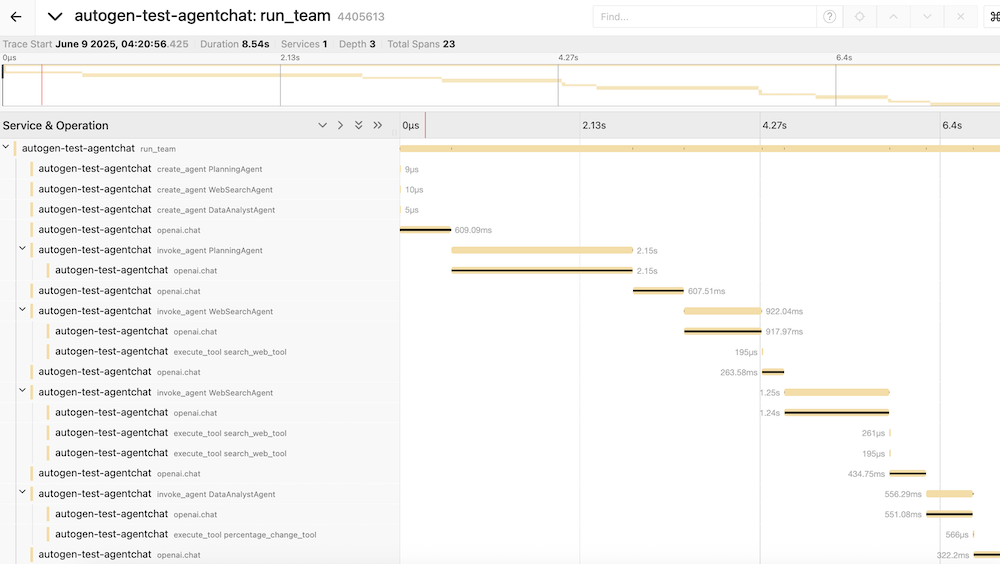
Sie können dann die Jaeger UI verwenden, um die vom obigen Anwendungsdurchlauf gesammelten Traces anzuzeigen.